
Want to learn more about data recovery?
This comprehensive learning guide is designed to clarify complex subjects, from SSD terminology explained (like NAND flash and TRIM) to the definitions of common drive failures explained (like head crashes and RAID definitions). Whether you are a technician, a business owner, or a home user, this resource breaks down the essential data loss terms and data recovery methods list you need to know."
1. Hard Disk Drives (HDD)
These terms relate specifically to the components and mechanical operation of traditional spinning hard drives, which store data magnetically on platters.
HDD vs. SSD behavior: A logical file corruption on an HDD is generally easier to recover from because the data remains physically on the platter; on an SSD, the same corruption may trigger TRIM/Garbage Collection, making recovery exponentially harder.
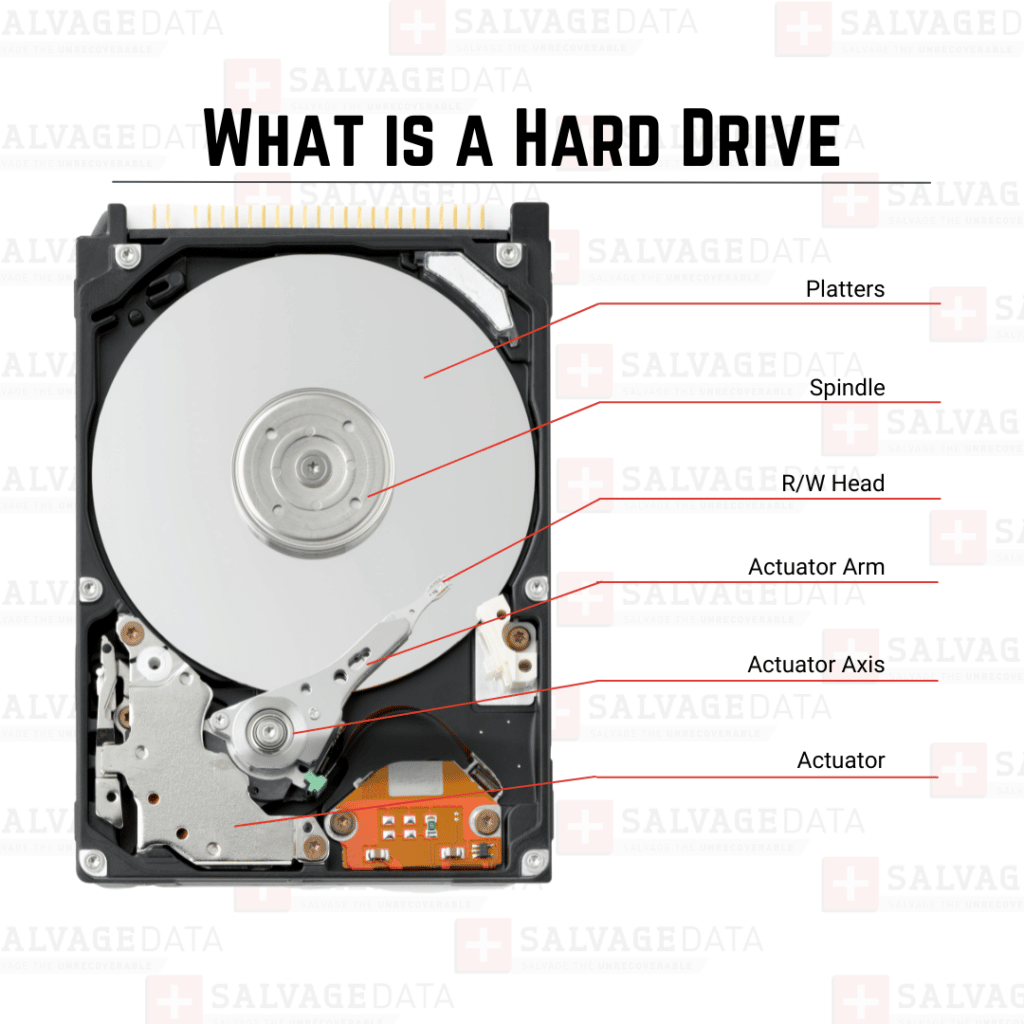
Actuator Arm
The mechanical arm inside a hard drive that moves the read/write heads. Think of it like the arm on a record player, rapidly positioning the heads to find or write your data on the spinning platters.
Areal Density
The high-level engineering term for the amount of data that can be packed onto a hard drive platter. Higher density means more capacity in the same physical space.
CMR (Conventional Magnetic Recording)
The traditional and more reliable method for writing data to a hard drive where the write track is narrower than the read track, and tracks are written next to each other without overlapping.
Cylinder
A technical term for all the tracks on all the platters in a hard drive that are in the same position. If you imagine a can passing through the drive, it would pass through all the "Cylinder 5" tracks.
CHS (Cylinder, Head, Sector)
This is the old-school addressing method for hard drives, which specified data by its physical location (which cylinder, which head, and which sector). It was replaced by LBA (Logical Block Addressing).
Dynamic Fly Height
A sophisticated feature in modern HDDs where a heater on the read/write head dynamically adjusts the fly height (the distance to the platter) in real-time. This is done to compensate for variables like temperature and vibration, which is a critical adjustments for advanced recovery.
Flying Height
The microscopic distance, measured in nanometers, that a hard drive's read/write head "flies" above the surface of the spinning platter. A "head crash" is when this height drops to zero.
HDA (Head Disk Assembly)
The sealed, internal mechanical core of a hard drive. It includes the platters, spindle motor, head assembly, and actuator.
HDD (Hard Disk Drive)
The traditional spinning hard drive uses magnetic platters and a moving arm (actuator) to store data. They offer huge storage capacities but are slower and more fragile than SSDs.
Check out our in-depth article on What is a Hard Drive for more information.
Head Assembly
This component holds the tiny read/write heads that hover just above the platters. It's an incredibly delicate, high-precision component that fails during a "head crash."
Helium Drive
A modern HDD design where the internal space is filled with helium instead of air. Because helium is much less dense than air, it reduces drag on the platters and heads, allowing manufacturers to stack more platters (up to 8 or 9) in the same standard enclosure, significantly increasing capacity and power efficiency.
HMMR (Heat-assisted Magnetic Recording)
A next-generation enterprise-level technology that uses a tiny laser to heat a spot on the platter just before writing. This temporary heating makes the media easier to magnetize, enabling far greater areal density and capacity.
Interleave
This is an old-school term for a performance trick on very slow HDDs. It involved staggering the sectors so that by the time the driver was ready to read the next sector, the platter had spun to the right spot.
Landing Zone
A dedicated, non-data area on an HDD platter where the heads are "parked" when the drive is powered off. This prevents them from stopping on a data area, which could cause "stiction."
MAMR (Microwave-Assisted Magnetic Recording)
A high-capacity, enterprise-level recording technology that uses a microwave spin-torque oscillator to make the magnetic media easier to write. This increases the possible data density on the platters.
MR Head (Magneto-resistive Head)
A more advanced type of Read/Write head that is much more sensitive to magnetic changes than older types. This increased sensitivity enabled much higher areal density (more data per platter).
Platter
These are the circular, mirror-finish disks inside an HDD where all your data is stored as magnetic charges. They spin at thousands of RPM, and the heads fly just nanometers above their surface.
Read/Write Head
The tiny component at the tip of the actuator arm that does the actual work. It's a microscopic electromagnet that reads your data by sensing magnetic fields and writes data by changing them.
RPM (Revolutions Per Minute)
The speed at which the platters in a hard drive spin. Common speeds are 5400 RPM and 7200 RPM.
Sector
The smallest physical unit of storage on a drive's platter. Traditionally, this was 512 bytes, but most modern drives use 4096-byte (4K) sectors.
Service Area
This is a hidden, non-user-accessible area on an HDD's platters. It's where the drive stores its own critical operating firmware, defect lists, and S.M.A.R.T. logs.
Servo
Refers to the "servo motor" (also called a "voice coil") that moves the actuator arm with extreme speed and precision. It also refers to the "servo data" on the platters that the heads read to know their exact position.
SMR (Shingled Magnetic Recording)
A high-density writing technology where new data tracks are partially overlapped (like shingles on a roof). This allows for much higher capacity, but rewriting data requires reading and rewriting entire chunks, which can slow performance and complicate data recovery, especially on drives like Western Digital's that use a complex T2 Translator for non-linear writing.
Spindle Motor
The high-precision motor at the center of a hard drive that spins the platters. A failure here is catastrophic, and the drive will make no sound or may make a faint "whirring" sound as it tries to spin up.
Track
One of the many concentric, circular paths on a platter where data is written. The actuator arm moves the head to a specific track to read or write data.
Track Zero
The outermost track on a hard drive platter. It's a critical location, as it's where the boot record and partition table are typically stored.
Voice Coil
The electromagnetic motor that moves the actuator arm (and the read/write heads). It works like a speaker, using an electric current and a permanent magnet to create rapid, precise movement.
Zoned Recording
A design technique used in modern HDDs to increase capacity. Since the outer tracks of a platter are physically longer than the inner tracks, zoned recording packs more sectors onto them.
2. Solid-State Drives (SSD) & Flash Media
This cluster covers the non-volatile memory technologies used in modern flash storage, including the processes required to maintain their health and manage data retention.
Controller (SSD/HDD Controller)
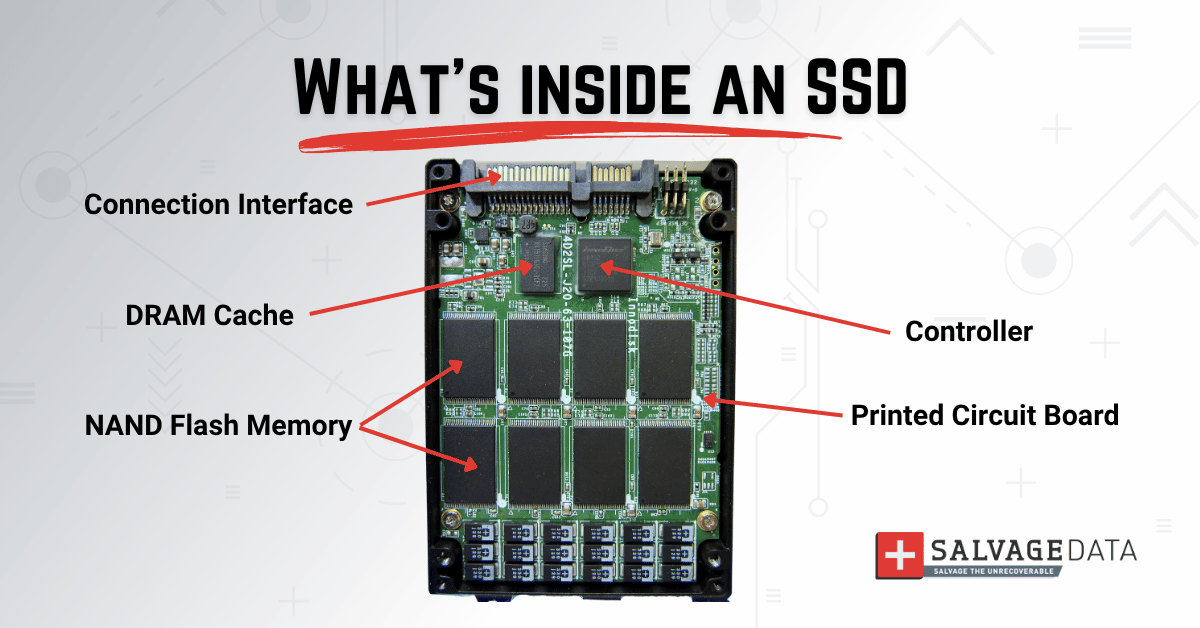
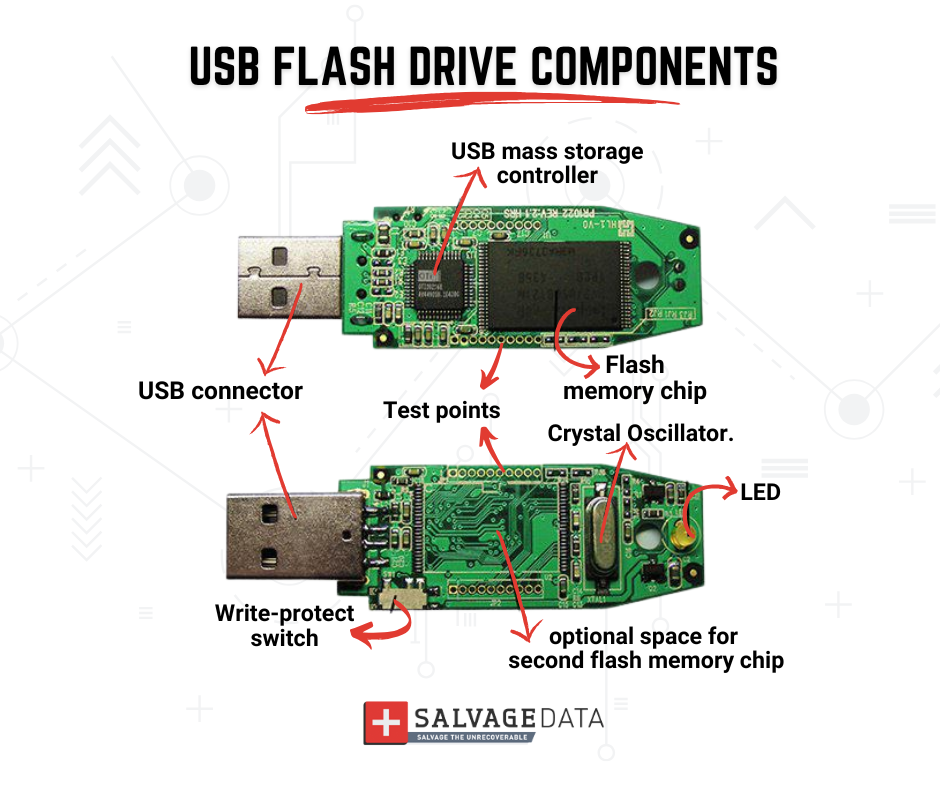
The "brain" of the drive exists as a chip on its circuit board (PCB). It manages all data traffic, error correction, and, on SSDs, complex tasks like wear leveling.
Die
In an SSD, a die is the smallest physical piece of silicon (chip) that contains the NAND memory cells. An SSD has multiple NAND packages, each containing multiple dies. The controller communicates with each die independently.
Dynamic XOR (Dynamic Exclusive OR)
A modern data manipulation technique used by some SSD controllers before writing data to NAND. It is used in conjunction with LDPC for enhanced error correction and can make the raw data pattern on the flash chips resemble white noise, further complicating a chip-off recovery.
Flash Blocks
The individual sections on a NAND flash chip (in an SSD) are where data is stored. SSD recovery often involves the complex puzzle of reassembling data from thousands of these blocks.
Garbage Collection
An automatic maintenance process inside an SSD. It tidies up data blocks that are no longer in use, ensuring the drive has fresh space ready for fast writes.
LDPC (Low-Density Parity Check)
A highly efficient error correction algorithm used by modern SSD controllers to detect and correct errors in the NAND data, crucial for maintaining data integrity in high-density flash memory.
Monolithic Flash
A type of "all-in-one" chip found in many small USB drives and SD cards, where all components are sealed in one block of plastic. They are notoriously difficult to recover from because there are no standard pinouts to read the data.
NAND Flash Memory
The non-volatile memory chip that stores data in all SSDs, USB drives, and smartphones. It's "non-volatile" because it holds your data even when the power is off.
Plane (NAND Plane)
A plane is a division within a NAND die. An operation (like reading or writing a page of data) is typically carried out on one plane, but modern controllers can use multi-plane operations to speed up the process. This concept is important for understanding SSD performance and complex recoveries.
SSD (Solid-State Drive)
The modern standard for storage, which uses NAND flash memory chips instead of moving parts. They are dramatically faster, more durable, and more reliable than traditional HDDs.
TRIM
A command that the operating system sends to an SSD to let it know which data blocks are no longer needed (like from a deleted file). While this improves the SSD's speed and health, it also makes deleted data permanently unrecoverable. That's bacause the OS instructed the controller to permanently erase the block, which is critical for customers to understand when seeking recovery.
Wear Leveling
A critical background process managed by an SSD's controller. It intelligently spreads out write operations across all the memory chips to ensure they wear out evenly, which dramatically extends the drive's total lifespan. For example, on a Samsung 970 EVO, the controller works constantly to ensure that cell X is written to just as often as cell Y, preventing a single chip from failing early.
XOR (Exclusive OR)
A basic logical operation (and a data recovery technique) used to combine data and parity. In flash recovery, raw data is often 'scrambled' with an XOR mask by the controller, which must be reversed (or XORed again) to retrieve the original, readable information.
3. RAID and NAS
These terms describe multi-drive storage solutions, typically used by businesses and power users for data redundancy, network accessibility, and performance.
Array (Disk Array)
A group of individual disks that work together as one single, large drive. This setup (like RAID) is used to either boost performance or protect data if one disk fails.
Host
The main computer or server that a device (like an external hard drive or a peripheral) is connected to.
Host Adapter
The piece of hardware that allows the "host" computer to talk to a specific type of device. A SCSI card or a USB controller card is a type of host adapter.
Hot Spare
A standby drive in a RAID array that does nothing but wait. If another drive in the array fails, the hot spare automatically kicks in and starts rebuilding the data, minimizing downtime.
LUN (Logical Unit Number)
In a large storage network (SAN), a LUN is a number that identifies a specific chunk of storage assigned to a server.
NAS (Network Attached Storage)
A small server with one or more hard drives, designed to share files over a network. It's like having a private cloud in your home or office, often running its own mini-RAID.
Parity
In a RAID array, parity is a way of storing redundant information without making a full 1-to-1 copy. This "parity data" is what allows the RAID to rebuild all the missing data if one of the drives fails.
RAID (Redundant Array of Independent Disks)
A technology that combines multiple hard drives into one system. It's used either for speed (RAID 0) or for redundancy to protect data against a drive failure (RAID 1, 5, 10).
SAN (Storage Area Network)
A high-speed, enterprise-level network designed specifically to connect servers to a large, shared pool of storage. It's a much more complex and powerful version of a NAS.
Server
A powerful computer whose entire job is to provide services, like hosting websites, running a database, or sharing files, to other computers ("clients") on a network.
4. Errors, Damage & Failures
These terms define the symptoms and causes of data loss, whether due to hardware failures or logical problems with the data structure.
Accidental File Deletion
The most common form of logical data loss, simply means that a user deleted a file they didn't mean to. The data is usually still there until it is overwritten by new information.
Bad Sector
A tiny spot on a drive's surface that has become damaged and can no longer reliably store data. Drives track these to avoid errors, but too many bad sectors are a sign of a failing drive. Also known as Bad Blocks.
Boot Loop
A common failure where a device (like a computer or smartphone) tries to start, fails, and then restarts, over and over. It's usually caused by corrupted system files or a hardware-level problem.
Click of Death
The distinct, repetitive clicking sound a hard drive makes when it's mechanically failing. It's the sound of the actuator arm trying and failing to find the right track, often because the heads are damaged.
Corrupted File
A data file that has been damaged and cannot be opened or used by its application. Corruption can be caused by software bugs, system crashes, or bad sectors on the drive.
Cross-Linked Files
A specific file system error where two different files are listed as owning the same cluster on the disk. It's a sign of data corruption, and at least one file will be damaged.
Cyclic Redundancy Check (CRC)
An error-checking method. When data is read back, a checksum is recalculated. If they don't match, the data is corrupt (a "CRC Error").
Data Corruption
Occurs when your data becomes unreadable due to errors, such as a file that won't open or photos that are garbled. It can happen due to software bugs, a sudden power loss during a save, or a failing drive.
Data Loss
The general term for any event in which data is destroyed, corrupted, or made inaccessible. It can be a logical issue (such as a deleted file) or a physical one (such as a dropped drive).
Deleted Data
Files that have been removed by the user or system. "Deleting" just marks the space as "available," leaving the actual data intact until it's overwritten.
Fragmentation
It's what happens on an HDD when a single file is stored in multiple, non-contiguous pieces (fragments) all over the platter. This slows down the drive because the head has to physically "seek" all over the disk.
Head Crash
A catastrophic physical failure where the read/write heads make contact with the platter surface. This grinds off the magnetic layer, destroying the data and the heads.
Logical Failure
A data-loss situation where the drive hardware is fine, but the data is inaccessible. This includes accidental deletion, formatting, or file system corruption.
Learn the difference between logical and physical data loss with our comprehensive guide.
Lost Cluster Chain
A file system error where a chain of clusters is marked as "in use" in the FAT, but there is no file or directory that points to it. It's "lost" data that's taking up space.
Overwritten Data
Data that has been permanently erased by having new data written to the same physical location on the drive. Once overwritten, data is unrecoverable.
Physical Failure
A data-loss situation where the drive itself is physically broken. This includes a head crash ("click of death"), a dead motor, or a fried circuit board.
S.M.A.R.T.
Self-Monitoring, Analysis, and Reporting Technology. A built-in monitoring system in all modern drives that watches for signs of failure, like rising error rates or bad sectors.
Stiction (Static Friction)
A physical failure where the read/write heads get "stuck" to the platter surface after the drive is powered down.
Unrecoverable Error
An error that is too severe for the drive's built-in ECC to correct. This is a sign of data corruption, and the drive will report the error to the operating system.
Wear and Tear
The expected, natural degradation of a drive's components that occurs from normal operation over time.
5. Recovery Methods, Technology & Processes
This section details the advanced, professional techniques and tools used in a data recovery lab to successfully retrieve data from failed devices.
Backup
A separate copy of your important files stored on a different device or in the cloud. If your main drive fails, this is what prevents total data loss.
Check our guides on how to backup a server and how to backup you personal computer to ensure your data is always safe.
Chip-Off Recovery
An advanced recovery technique for flash media (Monolithic Flash) where the hardware is too damaged to work. We physically desolder the NAND memory chip and read its raw contents with a special tool.
Cleanroom
A cleanroom is an ultra-clean lab environment with filtered air, essential for data recovery. Opening a hard drive anywhere else allows microscopic dust to settle on the platters, which can instantly destroy the heads.
Cloning (Disk Clone)
An exact, sector-by-sector copy of an entire drive, including hidden partitions. We always work from a clone, never the original damaged drive, to prevent further data loss during recovery.
Data Forensics
The science of recovering data for legal purposes. It involves preserving a perfect, untampered copy of the data (a forensic image) that can be used as evidence in court.
Data Recovery
The process of retrieving data from a failed, corrupted, or inaccessible storage device.
Decryption
The process of unscrambling encrypted data back into a readable format using the correct password or key. It's the final step in a successful ransomware recovery.
Defragment
The maintenance process for HDDs that reorganizes "fragmented" files, putting all their pieces back into one continuous block. This is not needed (and is harmful) for SSDs.
Diagnostic Service
The initial evaluation phase of data recovery. A technician analyzes the failed device to determine the exact cause of failure and the probability of a successful recovery.
Donor Drive
A healthy, functioning drive that is an exact match to the patient's failed drive. It is used to harvest critical components, such as the head assembly or PCB, for physical repair.
eDiscovery (Electronic Discovery)
The legal process of identifying, collecting, and producing electronically stored information (such as emails, documents, or databases) for a lawsuit or investigation.
Head Swap
The advanced physical repair of replacing a drive's entire failed head assembly with a working one from a donor drive. It's a delicate surgery that must be done in a cleanroom.
Image (Disk Image)
A single file that contains a perfect, bit-for-bit copy of an entire drive.
Media Cache Management Table (MCMT)
The proprietary logic used by Seagate SMR drives to track data written to the drive's media cache. Unlike Western Digital's T2 translator, the MCMT is used to manage the shingled data tracks and ensure data integrity.
PC-3000
The elite, industry-standard diagnostic and recovery tool for professional data recovery. It allows technicians to directly access a drive's firmware and hardware, bypassing the computer's operating system to repair complex failures.
PCIE-NVMe Recovery
The highly specialized process of recovering data from a Non-Volatile Memory Express (NVMe) SSD that uses the PCI Express interface. Due to the high speed and highly integrated nature of NVMe drives, this often requires proprietary hardware tools to bypass the controller and access the data directly.
Raw Recovery
A recovery method used when the file system is completely destroyed. The software ignores the file system and scans the entire drive, looking for file "signatures" (like the "header" that marks the start of a JPEG or DOCX file).
Remapping (Sector Remapping)
A built-in feature of all modern drives. If the drive finds a bad sector, it will mark that sector as "unusable" and "remap" its address to a spare, healthy sector.
6. Data Organization & File Systems
These terms define the logical structure and internal mapping that an operating system uses to organize files and folders on a storage device.
APFS (Apple File System)
The high-performance file system Apple uses on all its modern devices, like Macs and iPhones/iPads (iOS/iPadOS). It's built for speed on SSDs and includes strong, native encryption.
Block
A standard-sized data chunk. On a drive, a "logical block" is a uniform way for the OS to see data, which the drive controller then translates to the physical sectors.
Boot Record
The small, essential piece of data at the very beginning of your drive. It tells the computer how to find and load the operating system.
Cluster
The smallest unit of disk space that the file system can allocate to a file. Even a 1-byte text file will occupy one full cluster.
Directory
The "folder" that a file system uses to organize files. Technically, it's just a special file that contains a list of all the other files and directories inside it.
Ext4 (Fourth Extended Filesystem)
The default, modern file system used by most Linux distributions. It is highly reliable, robust, and supports very large file sizes and volumes.
Executable
An application file containing program instructions, commonly ending in ".exe" on Windows. Running an executable file launches a program.
Extended Partition
Under the old MBR partitioning scheme, you can only have four "primary" partitions. To get around this, you can create a single "extended" partition, which can then be subdivided into multiple "logical drives."
FAT (File Allocation Table)
An older, simpler file system that was the standard for DOS and early Windows. The "table" is a map of all the clusters, tracking which file belongs to which cluster.
File
This is a named collection of related data stored on a drive. To the operating system, everything is a file, from a text document to a driver or a directory.
File System
The "table of contents" for your drive, organizing all your data into files and folders. If the file system is corrupt, your computer can't find your files.
Format
The process of preparing a drive (or partition) for use by an operating system. It creates a new, blank file system (like NTFS or APFS) and, in the process, erases the "table of contents" for all existing data.
GUID (Globally Unique Identifier)
This stands for Globally Unique Identifier. It's a 128-bit number that Windows uses to track everything, from hardware to folders.
GPT (GUID Partition Table)
The modern standard for laying out the partitions on a drive, replacing the old MBR. It supports much larger drives (over 2TB) and is more robust.
HFS+
This was Apple's main file system for years on Macs before APFS was introduced. You'll still find it on many older Mac hard drives.
LBA (Logical Block Addressing)
The modern, universal standard for addressing data on a drive. The OS just asks for "block number 500," and the drive's controller figures out where that is.
Logical Drive
A drive or section of a drive that the operating system sees as a single, usable volume (like your C: drive).
MBR (Master Boot Record)
The old-school boot record standard used before GPT. It's less reliable and can't handle drives larger than 2TB.
MFT (Master File Table)
The heart of the NTFS file system. It's a special file (and database) that lists every other file and directory on the volume, including its attributes and where its data is physically located.
NTFS (New Technology File System)
The standard, default file system for all modern versions of Windows for decades. It's reliable and supports large files, permissions, and built-in compression.
Partition
A way of digitally "slicing up" a single physical drive into multiple, separate virtual drives. This is why you might have a C: drive and a D: drive on the same hard drive.
Partition Table
A small, critical table located in the boot record of a drive. It defines how the disk is divided up, listing the start and end of each partition.
Path
The unique "address" of a file or folder in a file system. It shows the complete route from the root of the drive to the file.
System Files
A general term for the critical files that the operating system itself needs to function. If these are corrupted or deleted, your computer will likely fail to boot.
Volume
A single, accessible storage area with one file system, recognized by the OS. It's basically synonymous with a "logical drive" or a "partition."
7. Connection Standards & Interfaces
These terms define the specific cables, ports, and communication protocols used to connect a storage device to the host computer.
Adapter
A general term for any hardware device that converts one connection type to another. In our world, this could be a SATA-to-USB adapter, an M.2 adapter, or a special card.
ATA (Advanced Technology Attachment)
The older standard interface for connecting hard drives to a motherboard, also known as IDE or PATA. It used a wide, flat 40-pin ribbon cable and was replaced by SATA.
Channel
A specific pathway for data. An old IDE controller had two channels (Primary and Secondary), each supporting two drives.
EIDE (Enhanced IDE)
An update to the original IDE/ATA standard that enabled larger, faster hard drives.
Firewire (IEEE 1394)
A high-speed interface, similar to USB, that was popular on Apple computers for a time. It was commonly used for external drives and digital video cameras.
IDE (Integrated Drive Electronics)
The original, common name for the ATA interface. It's called "integrated" because the controller logic was built onto the drive itself.
Interface
The specific type of connection and protocol used to link two devices. Common storage interfaces include SATA, USB, NVMe, and SAS.
Jumper
This is a small plastic-and-metal clip that was used on older hardware (like PATA/IDE drives) to change a setting. You would move a jumper to designate a drive as "Master" or "Slave."
Master / Slave
The jumper-based configuration for PATA/IDE drives. On a single IDE cable with two drives, one had to be set as the "Master" (primary) and the other as the "Slave" (secondary).
NVMe (Non-Volatile Memory Express)
A highly efficient communication protocol built specifically for SSD that uses the PCIe (Peripheral Component Interconnect Express) interface. It is significantly faster than SATA because it minimizes the data bottlenecks inherent in older protocols.
Protocol
An established set of rules and standards for how two devices communicate. SATA and USB are both protocols; they define how data is formatted, sent, and acknowledged.
SAS (Serial Attached SCSI)
The high-performance interface standard used in enterprise servers and storage systems. It's the "bigger brother" to SATA, offering higher speeds, dual-port redundancy, and better reliability.
SATA (Serial ATA)
SATA is the modern, universal standard for connecting consumer hard drives and SSDs to a computer's motherboard. It uses a small, thin cable and replaced the old PATA/IDE standard.
SCSI
An older, high-performance interface standard that was used in servers and high-end workstations. It allowed for a "daisy chain" of multiple devices on one controller.
8. Software, Firmware, and Hardware
This cluster groups the foundational programs and general hardware components that allow a computer system and its storage devices to function.
Application
A software program that performs a specific task for the user, such as Microsoft Word, Google Chrome, or Photoshop.
BIOS (Basic Input/Output System)
The low-level software built into your computer's motherboard that wakes up all the hardware when you first turn it on. It tells the computer how to find and load the operating system.
Boot Disk
This is the specific drive (HDD, SSD, or even a USB drive) that contains the operating system files. The computer is "booting" from this disk to load Windows, macOS, or Linux.
Bus
The electronic pathway that allows different components in a computer to communicate with each other. Think of it as the "highway" that connects the CPU, RAM, and your storage drives.
CMOS
A tiny chip on the motherboard, powered by a small battery, that stores your computer's BIOS settings.
CPU (Central Processing Unit)
The main "brain" of the computer, responsible for executing all instructions and performing calculations. It works closely with RAM and storage to run your applications.
DMA (Direct Memory Access)
This is a high-efficiency feature that allows a device (like a hard drive) to transfer data directly to and from the RAM, without involving the CPU for every single byte.
DOS (Disk Operating System)
This was the text-based, command-line operating system (like MS-DOS) that was common before Windows.
Driver
A small piece of software that acts as a "translator," allowing the operating system (like Windows) to communicate with a specific piece of hardware (like a hard drive).
Expansion Card
Any circuit board you plug into a slot (such as PCIe) on your motherboard to add new functionality, such as a video card or a dedicated RAID controller.
FDISK
This was the classic command-line tool in DOS and early Windows used to partition a hard disk.
Firmware
The low-level "operating system" of the drive itself, controlling its most basic functions. When the firmware gets corrupted, the drive might not even be recognized by the computer.
Form Factor
This refers to the physical size and shape of a piece of hardware. The most common form factors for drives are 3.5-inch (for desktops) and 2.5-inch (for laptops).
Initialization
This is the process of preparing a brand new disk for use. In Windows, it's the first step where you choose a partition style (MBR or GPT) before you can format it.
IRQ (Interrupt Request)
This is a signal that a piece of hardware sends to the CPU to "interrupt" it and demand attention. This is how your mouse, keyboard, and hard drive get the CPU's attention when they have new data.
Kernel
The central, core component of an operating system. It manages everything at the lowest level, including the CPU, memory, and all hardware devices.
Motherboard
The main circuit board in a computer that everything else plugs into. It's the "backbone" that connects the CPU, RAM, storage, and all expansion cards.
OEM (Original Equipment Manufacturer)
This is a company that builds and sells products or parts that are then used by another company under its own brand. For example, Seagate and Western Digital are OEMs that sell hard drives to Dell, HP, and Apple.
Operating System (OS)
The main software that manages all the hardware and software on a computer. It's the foundation on which all your applications run (examples: Windows, macOS, Android).
PCB (Printed Circuit Board)
The green circuit board on the bottom of a hard drive. It contains the drive's controller and other electronics that allow it to communicate with the computer.
POST (Power-On Self-Test)
The quick series of diagnostic checks the computer's BIOS/firmware runs every time you turn it on. It checks for the CPU, RAM, and keyboard.
ROM (Read-Only Memory)
A type of memory that is permanently programmed at the factory and cannot be changed. A drive's PCB contains a ROM chip that holds its unique firmware and adaptive data.
9. Cybersecurity & Data Protection
This section covers the external threats that cause data loss (like malware and ransomware) as well as the proactive strategies that prevent it (like backups and encryption).
Anti-Virus
Software designed to detect, quarantine, and remove malicious software (like viruses, trojans, and worms).
Auto Save
A feature in an application that automatically saves a copy of your work at regular intervals, protecting against data loss from a sudden crash or power outage.
Backup
A separate copy of your important files is stored on a different device or in the cloud.
Cloud Backup
A service that automatically copies your data over the internet to a secure, remote server (the "cloud"). It's a critical protection against local disasters.
Cybersecurity
The practice of defending computers, networks, and data from criminal attacks or unauthorized access.
Encryption
The process of scrambling data so it can be read only by someone with the proper key. It's used for security and by ransomware to hold your files hostage.
Malware
A broad term for any malicious software, like viruses, spyware, or, most dangerously, ransomware. Its entire purpose is to damage your system or steal your data.
Ransomware
A vicious type of malware that encrypts all of your files, making them totally unusable. The attackers then demand a ransom payment in exchange for the decryption key.
Tape (Magnetic Tape)
This is an older, high-capacity storage medium still used by large corporations for long-term archival backups. It's very cheap per gigabyte but also very slow to access (you have to "rewind" it).
Virus
A specific type of malware that works by "infecting" other legitimate files. It inserts its own malicious code into an executable file, and when you run that program, the virus is activated.
10. Metrics & Concepts
These terms are used to quantify drive performance, reliability, and data structure, providing insight into a drive's health and efficiency.
Access Time
The total time it takes a drive to respond to a data request. It's a combination of "Seek Time" (moving the heads) and "Latency" (waiting for the platter to spin).
Archive
A collection of data that has been moved to long-term storage and is no longer actively in use. This includes old project files or backups, often stored on tape or external hard drives.
Bandwidth
A measure of how much data can be transferred in a set amount of time (e.g., megabytes per second). Higher bandwidth means faster performance for a drive interface or network connection.
Bit
This is the smallest possible unit of data a computer can read: a single 1 or 0. All your files are made up of millions or billions of these.
Buffer
A small, temporary holding area for data, usually in fast RAM. Drives use a buffer (or cache) to speed up small, repetitive tasks.
Byte
The standard unit of digital storage, made up of 8 bits. A single letter in a text file is typically one byte.
Cache
A small amount of very fast memory used to store frequently accessed data, speeding up performance. Your drive has a cache, your CPU has a cache, and your web browser has a cache.
Capacity
The total amount of data a storage device can hold, measured in gigabytes (GB) or terabytes (TB).
Data Transfer Rate
Measures how quickly data can be transferred from one location to another, typically in megabytes per second (MB/s).
DRAM (Dynamic RAM)
The type of memory technology used for your computer's main RAM. It needs constant power to refresh itself, which is why it's volatile (loses everything when power is cut).
ECC (Error Correction Code)
An advanced form of error correction that can not only detect errors but also correct small, on-the-fly errors, which is critical for data integrity.
I/O (Input/Output)
I/O refers to any communication between the computer and the outside world (or its peripherals). Reading from a drive is "Input," and writing to it is "Output."
Latency
The measure of a delay. In hard drives, "rotational latency" is the time you have to wait for the platter to spin around to the exact sector you need.
Media
The physical material that actually stores the data. On an HDD, the "media" is the magnetic surface of the platters.
MTBF (Mean Time Between Failures)
A statistic used by manufacturers to estimate the reliability of a hardware component. It's a theoretical average of how many hours of operation a drive should last before a failure.
RAM (Random Access Memory)
Your computer's short-term "working" memory, and it's volatile (it erases when you power off).
Read Verify
A safety check where, immediately after writing data, the driver's head will pass back over it to ensure it was written correctly and can be read back without error.
Seek Time
The time, measured in milliseconds, that it takes for the actuator arm to move the read/write heads to the correct track on the platter.
Sequential Access
The process of reading or writing data in a long, continuous stream, in order (like watching a movie file). This is where HDDs are fastest, as the head doesn't have to jump around.
TPI (Tracks Per Inch)
A measure of how tightly the tracks are packed together on a platter. A higher TPI means a higher areal density and more storage capacity.
Virtual Machine (VM)
A complete computer (like a Windows 11 PC) that runs as a single, large file on top of another operating system. Recovering data from a corrupted VM file is a specialized process.