
Key Takeaways
- Unified Memory is RAM with a new layout. Apple integrates it into the SoC, so the CPU and GPU share a single memory pool rather than using separate ones.
- It cannot be upgraded later. Memory is soldered to the chip package, and capacity is fixed at the time of purchase.
- It changes the data recovery picture. When the M-series CPU fails, the standard path to user data fails with it, because memory, controller, and encryption keys all live on the same chip.
Unified Memory is Apple's memory architecture, introduced with Apple Silicon in 2020. Instead of separating system RAM from graphics VRAM, Apple integrates memory directly into the System on a Chip (SoC), so the CPU, GPU, Neural Engine, and media accelerators share a single high-bandwidth memory pool. The result is faster data movement, lower latency, and a meaningful performance gain over older Intel-based Macs. It also creates a trade-off most buyers do not consider: when an Apple Silicon Mac fails at the chip level, the memory contents are tied to the same hardware, directly affecting Mac and MacBook data recovery.
The bandwidth jump is substantial, which explains why Apple Silicon Macs feel different when running memory-heavy work like 4K video editing, machine learning, and local AI models.
How unified memory works
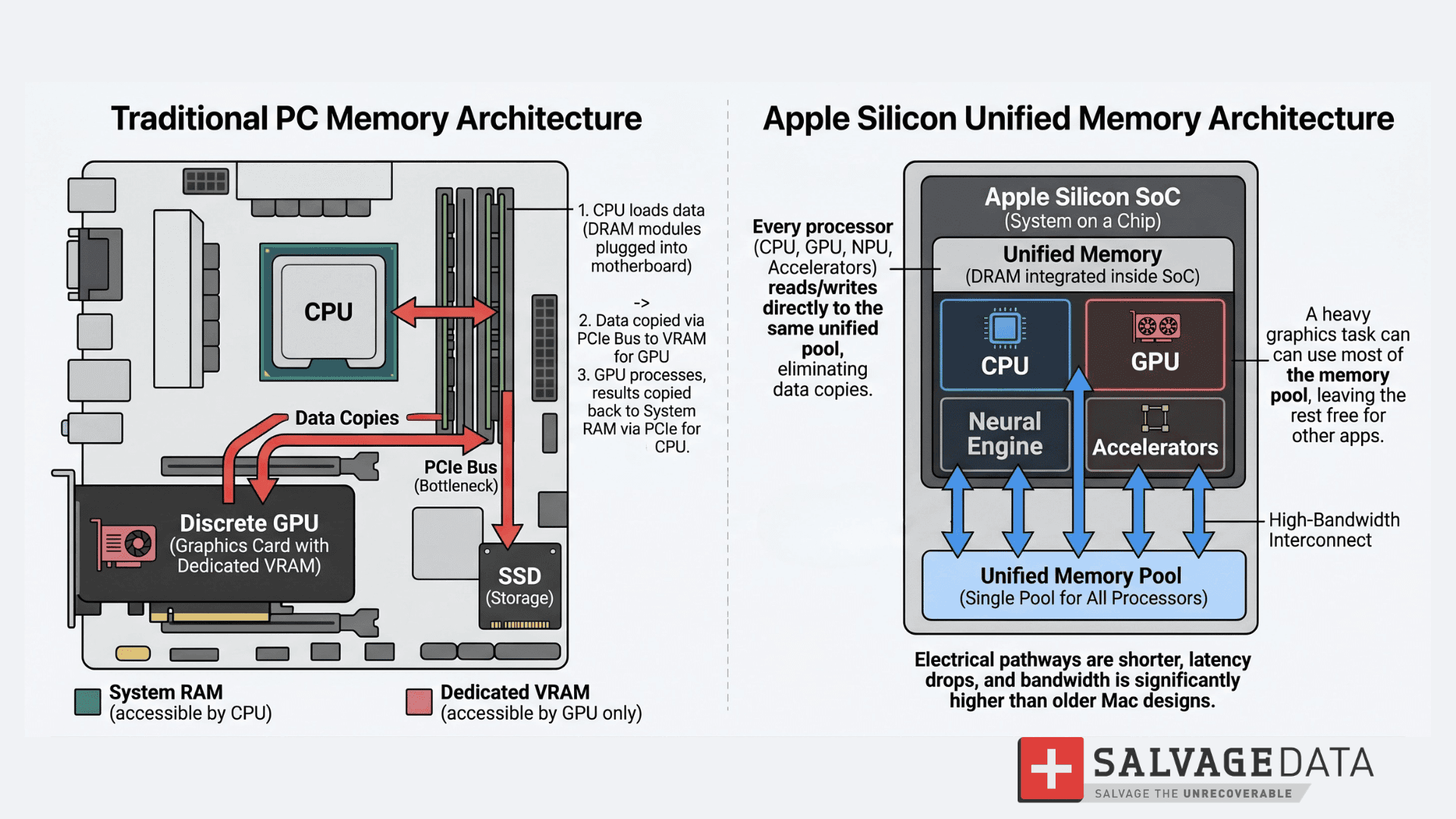
Unified Memory works by placing DRAM modules directly inside the Apple Silicon SoC package, alongside the CPU, GPU, Neural Engine, and other accelerators. Every processor reads from and writes to the same memory pool over a high-bandwidth interconnect, eliminating the need to copy data between CPU RAM and graphics VRAM.
On a traditional PC, system RAM lives on modules plugged into the motherboard, and the GPU usually has its own dedicated VRAM on the graphics card. When the GPU needs data that the CPU holds, that data must be copied across the PCIe bus to VRAM. The reverse is true when the CPU needs to read results back from the GPU.
Apple Silicon removes that round trip. The memory is part of the chip itself, electrical pathways are shorter, latency drops, and bandwidth is significantly higher than older Mac designs. A unified pool also means there is no fixed split between system and graphics memory. A heavy graphics task can use most of the pool, while a memory-light workload leaves the pool free for other apps.
One clarification worth making upfront: Unified Memory is RAM, not storage. The SSD inside a Mac is a separate component, even though both are usually soldered to the logic board on modern designs.
Unified memory vs RAM: are they the same thing?
Yes, Unified Memory is RAM. It is the same type of volatile memory used in any computer, just packaged differently and shared differently. The confusion comes from marketing. Apple uses the term "Unified Memory" because its architecture differs from that of a standard Windows PC. The underlying chips are still DRAM, the same memory technology that has been in computers for decades.
| Attribute | Unified Memory (Apple Silicon) | Traditional RAM (Windows PC) |
| Location | Integrated into the SoC package | Separate modules on the motherboard |
| Shared with GPU | Yes, single pool | No, a GPU usually has dedicated VRAM |
| Upgradeable | No, soldered | Yes, in most desktops and many laptops |
| Bandwidth (high-end) | Up to ~400 GB/s on M1 Max | Typically 25–50 GB/s on consumer laptops |
| Power efficiency | Higher, due to shorter pathways | Lower, due to longer signal paths |
For the integrated GPU on Apple Silicon, the shared pool serves the same functional role as dedicated VRAM. The distinction matters when comparing against discrete GPUs: high-end workstation cards from Nvidia and AMD carry their own dedicated VRAM and deliver higher raw graphics throughput.
For large-scale AI training, complex enterprise rendering, and high-end gaming, a discrete GPU remains the stronger option. For everything Apple Silicon is designed to do, the shared pool handles it without the overhead of moving data between separate memory banks.
Bandwidth and latency differences
Placing memory on the SoC package reduces the physical distance data must travel. That reduces latency, the small delay between asking for data and getting it back. It also opens up wider data paths, which increases bandwidth.
Memory bandwidth on M1 Max reaches approximately 400 GB/s, according to third-party benchmarks. A standard DDR4 laptop runs at around 25-50 GB/s. The gap is meaningful on workloads that move large amounts of data, including 4K video editing, 3D rendering, and AI inference.
Is 16GB unified memory the same as 16GB RAM?
16GB of Unified Memory is the same amount of physical RAM as 16GB in a Windows laptop, but it does not always behave identically. Two factors change the comparison.
First, on a traditional PC, the GPU often has its own VRAM, so the 16GB of system RAM is dedicated to the CPU and applications. On a Mac, the same 16GB is shared with the GPU, the Neural Engine, and other accelerators.
Second, macOS aggressively uses memory compression and fast SSD swap. On many workloads, 16GB on a Mac feels similar to a higher-capacity Windows machine. In memory-heavy professional work, the shared pool becomes the constraint instead.
The practical answer: 16GB is enough for most users, but it falls short for creative or AI work.
How much unified memory do I need?
The size of the memory depends on your purpose for the machine. Each task demands different performance, and you might not need to invest in an expensive device if you’ll use it to study or for light work, for example.
| Memory | Typical user | What it handles |
| 8GB | Casual users | Web, email, streaming, light office work |
| 16GB | Mainstream users | Multitasking, spreadsheets, photo editing, and light video |
| 24–32GB | Power users | 4K video editing, software development, virtualization |
| 64GB+ | Creative pros and developers | 4K/8K timelines, 3D rendering, local AI models |
| 96GB and up | Specialized AI and enterprise | 70B+ parameter LLMs, large datasets |
For most buyers, 16GB is the safer floor, especially for a Mac they plan to keep for years. SalvageData’s coverage of cases where a Mac doesn't start up underscores a broader point: a Mac purchased today is one most people expect to keep for five years or more, so the sizing decision is also a longevity decision.
16GB to 32GB for power users
Developers, photographers, and prosumer video editors should consider 16GB a minimum, with 24GB or 32GB more comfortable. These tiers handle multiple browser tabs, IDE workloads, Lightroom or Photoshop, and 1080p to 4K video editing without sustained pressure on the memory pool.
The 24GB and 32GB options also leave room for future workloads. AI features integrated into macOS and creative apps continue to expand, and shared-memory architectures benefit from additional headroom.
64GB and above for AI workloads
64GB and 96GB configurations are typically chosen by professionals working with 8K timelines, complex 3D scenes, or local AI development. Apple Silicon's shared memory pool is a significant advantage for running large language models locally, as the GPU can access the full pool rather than being limited by a separate VRAM allocation.
Long-term reliability matters at this tier. Modern Macs also have soldered SSDs, so a buyer planning to keep a high-end Mac for many years should factor in how long SSDs last into the full ownership picture.
The hidden trade-off most buyers miss
Unified Memory cannot be upgraded after purchase, and on Apple Silicon Macs, it also cannot be separated from the rest of the chip if the chip fails. That changes the data recovery picture. When the M-series CPU dies, the memory, controller, and encryption keys go down with it.
On older Intel MacBooks, the storage drive was often a separate component. If the logic board failed, the drive could be removed and the data retrieved through another method.
Apple Silicon collapses that separation. "On Intel Macs with a T2 chip, or on any M-series Mac, a chip-level failure takes the data path with it," explains Michael Galloway, Senior Recovery Engineer at SalvageData. According to Galloway, modern MacBooks with soldered storage require the motherboard to be functional before data can be reached at all. On older Macs with removable drives, that was not always true.
This is part of why the lab spends so much time on cases like recovering data from a dead MacBook and the related symptom-driven guides, such as MacBook won't turn on. The pattern is consistent: a logic board fails, the Mac shows no signs of life, and the question becomes whether the chip can be brought back to a state where the data is readable.
The practical takeaway for buyers: Unified Memory is excellent for performance. The fact that it is soldered to the SoC is not just an upgrade limitation; it is a long-term reliability factor. Backups become more important on a machine where the data path and the processor are physically the same component.
Unified memory and the local AI boom
Apple Silicon's shared memory pool has become a preferred environment for running local large language models, because the GPU can access the full memory pool without the VRAM ceiling that limits consumer PC GPUs. As demand from AI developers increases, high-memory configurations have become more scarce in certain markets.
For most users, this trend is context rather than a direct purchase consideration. For anyone budgeting for a Mac specifically to run local models, plan for both capacity and availability.
Quick summary
Unified Memory is the defining architectural shift in Apple Silicon, and it solves real problems for users who care about responsiveness, bandwidth, and modern AI workloads. The trade-off is permanence: memory is part of the chip, capacity is fixed at purchase, and a chip-level failure takes the data path with it. Buyers planning to keep a Mac for years should size memory accordingly and treat backups as non-negotiable.
If a Mac has already failed and the data is at risk, a dead MacBook data recovery starts with a free diagnostic at SalvageData's lab.