
A hard drive that makes a clicking or grinding noise is signaling a mechanical problem, and continuing to use it risks permanent data loss. The clicking sound usually means the read/write head isn't working properly, and every second the drive keeps spinning increases the chance the data becomes unrecoverable. The first and most important step is to power the drive off.
What to do if your hard drive is clicking
Clicking noises are not a good sign and must be addressed immediately. Follow the next steps carefully to protect your data.
1. Power off the drive immediately. Shut down the computer or unplug the external drive. Every additional minute of use adds more damage.
2. Disconnect the cables. Unplug the USB cable for an external drive, or power down the PC for an internal one.
3. Do not run repair software. Tools like CHKDSK, virus scans, or "fix my drive" utilities force the drive to keep reading, which worsens clicking damage.
4. Contact a hard drive professional data recovery service. A clicking drive usually needs to be opened and repaired in a cleanroom, a sealed, dust-controlled space built for this kind of work.
Soft clicking vs. hard clicking: what's the difference
Not every click means disaster, so it helps to know which kind of sound you're hearing.
Soft clicking is usually a single, quiet click, sometimes when the drive is idle or first spinning up. This can be normal behavior, like the drive's head parking to save power, or it can point to a minor issue like small file corruption or a brief power dip. It's worth paying attention to, but it isn't automatically an emergency.
Hard clicking sounds louder and more metallic, and it often repeats in a steady rhythm before the drive spins down. This is the sound of mechanical failure, most often the read/write head striking or dragging across the disk surface. Hard clicking calls for an immediate shutdown and professional help.
What’s actually happening inside a clicking drive
Most clicking problems trace back to one of three areas inside the drive.
Read/write head and actuator arm failure
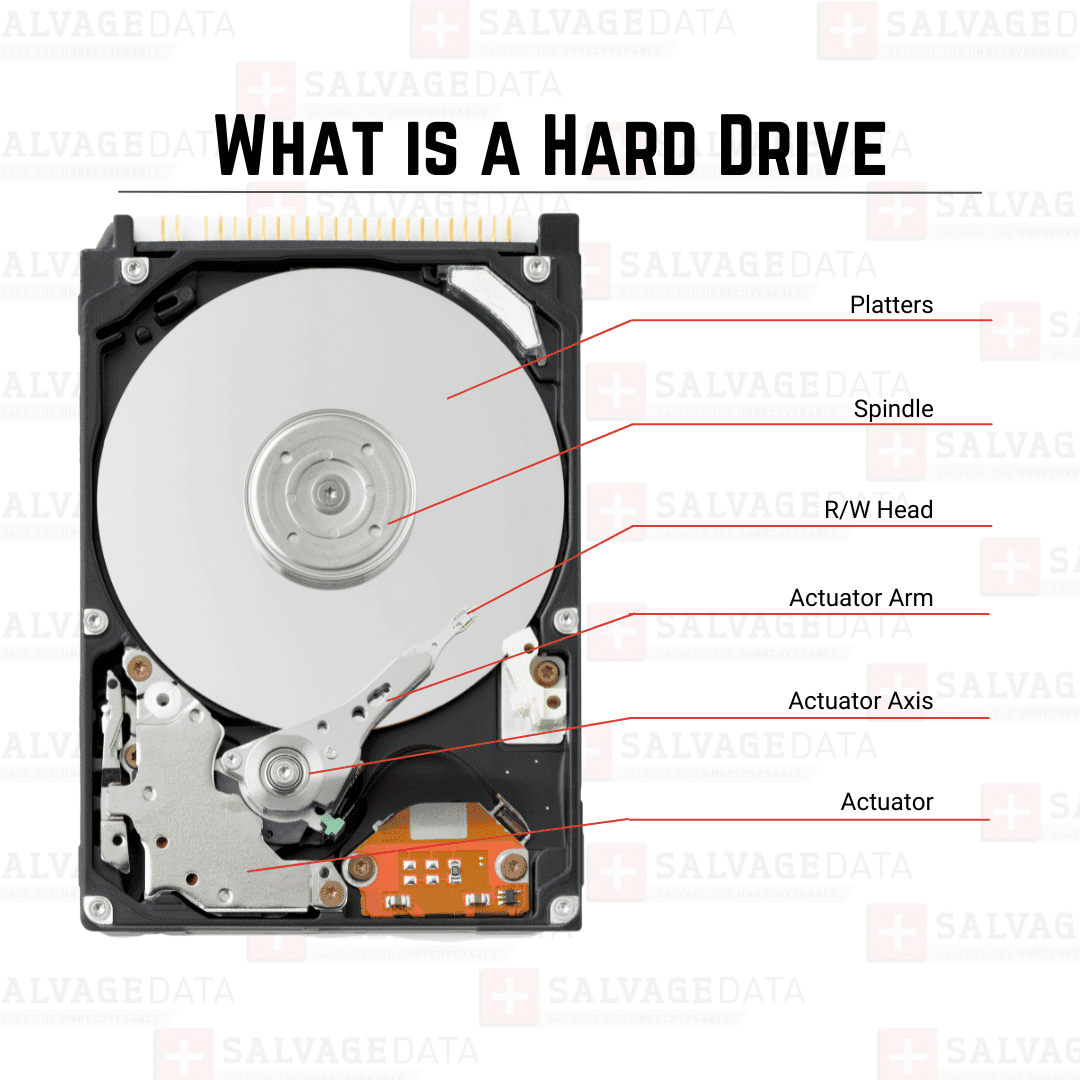
Inside every hard drive, a small arm moves a read/write head back and forth over a spinning disk, called a platter, to read and write your data. That head floats above the platter at a distance closer than a speck of dust.
When the head loses its footing, whether from wear, a shock, or a defect, it can begin scraping or striking the platter surface. This creates a grinding or clicking sound and can leave visible scratches or rings on the disk.
This kind of damage is one of the most common reasons a hard drive starts clicking, alongside common causes of hard drive failure like physical shocks, and it is not something a home fix can safely address.
PCB and power-related clicking
The drive's circuit board, called the PCB, controls power and communication for the whole unit. If the PCB is damaged or the drive isn't getting steady power, it can click repeatedly as it tries and fails to spin up properly.
This kind of clicking can sometimes be resolved by swapping a power cable or port, but replacing the PCB itself is trickier than it sounds. Each board is paired to its specific drive through a small chip that stores unique startup instructions. A replacement board from another drive, even the same model, usually will not work correctly without someone experienced moving that information over.
Firmware and Service Area corruption
Every hard drive keeps a small hidden section called the Service Area, which stores the instructions the drive needs just to start up and recognize its own components. If that section becomes corrupted, the drive's arm can get stuck trying repeatedly to read those instructions, which shows up as a steady, repeating click.
This is a firmware-level problem rather than a physical one, but it still requires specialized tools to fix and is not something general recovery software can reach.
Diagnostic overview:
| Sound / Symptom | Likely Cause | Component Involved | Safe to DIY? |
| Rhythmic clicking, then the drive spins down | Head or actuator arm failure | Read/write head, actuator arm | No — needs a cleanroom |
| Repeating click on power-up, no spin-up | Power issue or damaged circuit board | PCB / power supply | Sometimes — try a different cable or port first |
| Loud grinding along with clicking | Head striking the platter surface | Platters, spindle motor | No — high risk of permanent damage |
| Single, quiet click when idle | Normal head parking | Firmware | Yes — typically normal behavior |
| Steady clicking loop, drive won't initialize | Corrupted Service Area | Firmware | No — requires specialized tools |
Signs of a failing hard drive
Clicking rarely appears out of nowhere. Watching for these earlier signs can give you a chance to back up your data before a drive fails completely:
- Files taking longer than usual to open
- The computer freezing when accessing certain files
- Slower than normal boot times
- Errors appearing when copying or transferring data
- Occasional I/O device errors when the system tries to read the drive
If you notice several of these signs together, it's worth checking your drive's health before things get worse. You can also read more about the signs of a failing hard drive and what each one typically means.
Why you should never freeze or open a clicking drive yourself
"Heads could be grinding against the platters, causing scratches or rings. Clicking heads could be caused by a bad PCB or worn-out heads from a degraded surface,” explains Michael Galloway. “Always turn off the HDD when the drive is clicking or grinding. Always send it to a professional instead of trying DIY. We at SalvageData always power off the drive immediately and open the drive in a cleanroom."
A few DIY fixes for clicking drives circulate online, and it's worth explaining why they often do more harm than good.
What happens if you freeze the hard drive
Freezing the drive is a commonly repeated trick, but it does not fix anything internally. As the frozen drive warms back up, moisture from the air condenses inside the sealed unit. That moisture can corrode the platter surface and the delicate components around it, turning a mechanical problem into a much bigger one.
What happens if you open the hard drive
Opening the drive casing outside a cleanroom introduces another risk. Given how little clearance the read/write head has above the platter, a single dust particle that settles on the surface while the case is open can cause the head to crash into it, permanently destroying data in that area. This is why drives are only opened in cleanrooms in the first place.
A physically damaged drive, whether from a drop, a bad head, or a corrupted Service Area, is a delicate repair job. Sending it to a lab with the right tools and a controlled environment is the safest way to give your data a real chance of coming back.
Can a clicking hard drive be fixed?
Software cannot fix a mechanically clicking hard drive. Recovery programs and repair utilities are built to work with drives that are running normally; they cannot repair a damaged head or a failing actuator arm, and running them on a clicking drive usually makes things worse by forcing more reads on an already struggling mechanism.
What can work is physical restoration in a professional lab. Technicians can replace damaged heads, work around a corrupted Service Area, or carefully extract data directly from the platters when the drive can't be brought back to full working order.
This kind of work requires cleanroom conditions and specialized equipment, which is why data recovery labs handle it rather than general repair shops.
If your drive has already stopped working entirely, this guide on recovering data from a dead hard drive covers what that process typically looks like.
What if my hard drive is only clicking sometimes?
An intermittent click, one that comes and goes rather than repeating steadily, usually points to a specific trigger rather than constant mechanical failure. A few common causes include:
- Power fluctuations, especially with external drives that rely on a USB port or a shared power source
- Normal head parking, where the drive briefly moves its head to a safe position to save power during idle periods
- A loose or failing cable or port, which can cause the drive to lose and regain power repeatedly
- Early-stage bad sectors, where the drive struggles briefly to read a specific damaged area before continuing normally
Occasional clicking is still worth monitoring closely and backing up important files while you can. If the clicking becomes more frequent or turns into a steady, repeating sound, power the drive down and treat it as an emergency.
A drive that starts clicking after being dropped, in particular, often points to physical damage. You can read more about what to do after dropping a hard drive if that matches your situation.
If you're dealing with an external drive, external hard drive recovery services are built to handle the added complexity of USB enclosures and portable power setups.