
If you use VMware for your enterprise operations, you probably rely on its integrity and reliability. But, no technology is fail-proof, and you may face a corrupt VMDK file. Fortunately, things are not lost just yet and you can repair corrupt VMDK files in VMware.
VMDK stands for Virtual Machine Disk. It is a file format used by VMware virtualization software to represent a virtual hard disk drive (HDD). A VMDK file contains the contents of a virtual machine's hard disk drive, including the operating system, applications, and data.
VMDKs can be used to store a virtual machine's entire hard drive or just specific segments of it. They can be stored on local or network storage and moved between different hardware configurations or cloud environments. Multiple VMDKs can also be combined to create larger virtual disks.
How can a VMDK file get corrupted
If a VMDK file gets corrupted, it may result in data loss or an inability to access the contents of the virtual machine.
Power failure or sudden shutdown. If there is a sudden power failure or the system shuts down abruptly, it can corrupt the VMDK file.
Close the program or shut down the device without saving the file. Terminating the VMDK file without waiting for it to save properly can also lead to corruption.
Physical hard drive failure. The physical hard drive that contains the VMDK file can fail, leading to file corruption.
Virus or malware infection. A virus or malware infection can cause damage to the VMDK file.
Software errors or crashes. An error or crash in the software used to create, manage, or access the VMDK file can lead to corruption.
Storage device errors. Issues in the storage device like bad sectors or damages to storage media can also cause VMDK file corruption.
-
Corrupt VMDK files in VMware troubleshooting
Repairing a corrupt VMDK file is possible by following specific steps. A VMDK file consists of four files on a VM: the .vmdk file (descriptor), the Delta file, the RDM VMDK file, and the -flat.vmdk file (flat).
If your damaged VMDK file is RDM or flat, you should contact a data recovery service as repairing these files is not easy.You can repair the corrupt or damaged VMDK files (descriptor) in VMware using the below methods:
1. Repair corrupt VMDK files using Command Prompt
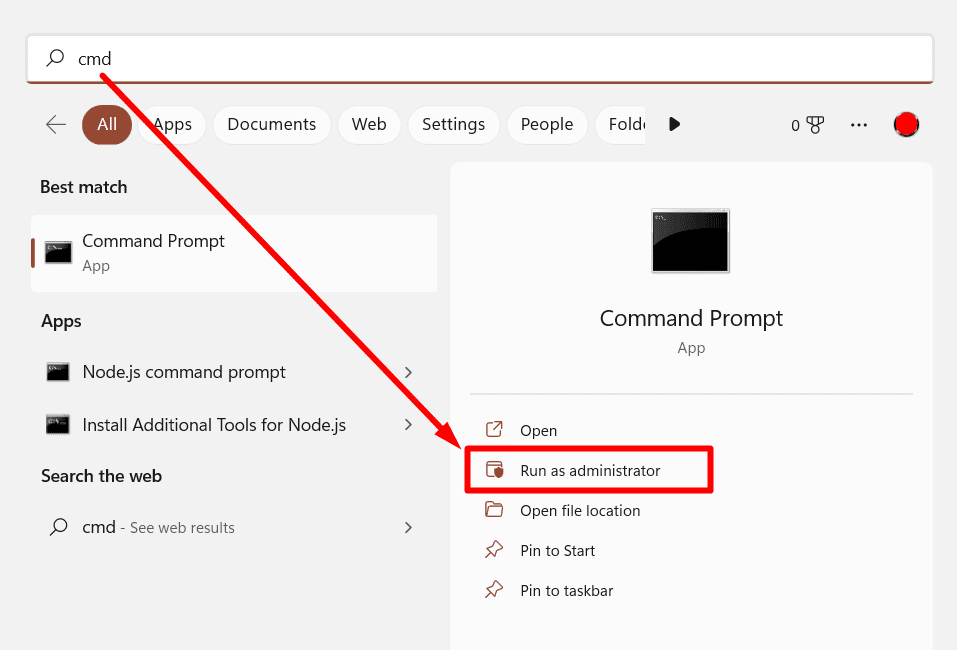
Type cmd in the Windows search box and then run as administrator. You can also press the Windows + X keys to open the command prompt.
After that, find the path for the VMware file installation location. A probable path would be C:\Program Files\VMware\Virtual Disk Development Kit\bin.
Use the path on the cmd window with the following command:
vmware-vsdiskmanager.exe – R “the qualified path to your VMDK.file”.
Hit Enter and wait while the scanning process repairs your corrupt VMDK files.If the repair was successful you will see the following message:
The virtual disk “corrupt vmdk file path location” was corrupted and has been successfully repaired
2. Repair the corrupt VMDK file via Machine Booting
If the issue is because of a corrupt VMDK file or VM server, the virtual machine fails to start. Then, you can try the following step to restore your files:
- Back up the data before proceeding.
- After that, create a copy of your system into another VM.
- Then, make the required fields and configuration modifications and save.
- Now, boot the virtual machine
3. Repair VMDK corrupted file with a backup
If you have a recent backup of your virtual machine data, you can restore the corrupt VMDK file with it
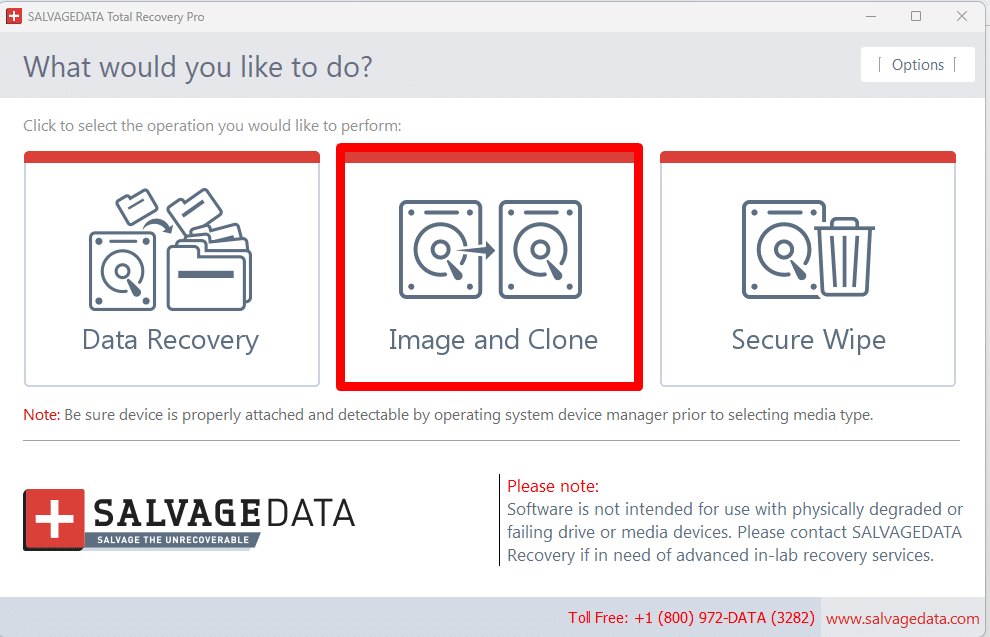
.You can use the SalvageData tool to create regular backups and then recover your lost or corrupted files from it wherever you need them. Create an image or clone your VM data into a new disk.
4. Contact a data recovery service to repair a corrupt VMDK file
In case of a corrupt VMDK file, your best chance of recovering the data is with the help of a recovery professional.Although the first three solutions are free, they are not as guaranteed as a professional virtual machine data recovery service.
That is because these professionals are experienced and work with cut-edge technology and proper tools to repair corrupt VMDK files.
Contact SalvageData experts 24/7 for a free evaluation. Our technicians can explore the best approach to restore the data and return it to you safely and corruption-free. You can also look for a recovery center near you.
How to prevent VMDK data corruption
- Keep software up to date. Keep virtualization software and hypervisors up to date with the latest patches and updates. This simple action can fix known bugs and security vulnerabilities.
- Implement backup and recovery procedures. Regularly back up VMDK files to ensure that data can be restored in the event of corruption or data loss.
- Implement security protocols. Deploy security protocols such as firewalls, antivirus/anti-malware, and intrusion detection and prevention systems. This helps prevent malicious attacks on the virtual environment.
- Use reliable storage devices. Use quality storage devices and hardware with built-in protection mechanisms such as RAID (redundant array of independent disks) or S.M.A.R.T. (self-monitoring, analysis, and reporting technology) to minimize the risk of hardware failures.
- Avoid sudden power failure. Use an uninterruptible power supply (UPS) to ensure that systems stay powered up in case of power outages.
- Monitor and test the virtual environment. Regularly monitoring and testing the virtual environment can help detect potential issues and resolve them before they cause significant problems.