
Realizing that critical files are missing from your USB flash drive can be a panic-inducing moment. Accidentally deleted files or missing files on your flash drive when you connect it to your computer can mean that years of work, memories, and important documents have been lost forever.
However, USB data loss is more common than you think, and recovery is usually possible. We'll walk you through a comprehensive approach to USB data recovery that goes beyond simple technical instructions.
Common reasons for USB flash drive data loss
Learning the reasons behind data loss helps to create effective prevention strategies to ensure data availability.
- Accidental deletion
- Unintended formatting
- Partial file transfers
- Broken or bent connectors
- Water or physical damage
- Wear and tear
- Improper ejection
- Virus infections
- File system errors
How to recover deleted files from a USB drive without software
Depending on the cause of the data loss, you can retrieve the lost files on your own without data recovery software or professional recovery services. That’s because there’s a difference between physical data loss and logical data loss that impacts the recovery method.
Method 1: Windows file recovery tool
Developed by Microsoft, the Windows File Recovery command-line utility is designed to help users retrieve lost data without needing third-party software. Although it lacks a graphical user interface (GUI), it offers powerful recovery options for various file systems, including NTFS, FAT, and exFAT. This tool is designed for advanced users who are comfortable with command-line operations, which may present a learning curve for some.
Windows File Recovery scans your storage device's file system to locate deleted files. Its effectiveness can vary depending on how long the files were deleted and whether new data has been written over them.
The tool requires you to specify both the source drive (where the deleted files were located) and the destination drive (where you want to save the recovered files). It automatically creates a recovery folder on the destination drive, typically named "Recovery_[date and time]."
To use theWindows file recovery tool for recovering lost files from a USB flash drive, follow these steps:
- Open the Microsoft Store on your Windows 10 (version 2004 or higher).
- Search for Windows File Recovery.
- Click on the Get button to download and install the application.
- Insert your USB flash drive into your computer and note the assigned drive letter (e.g., E:).
- Press the Windows key, type cmd, and right-click on Command Prompt. Select Run as administrator.
- In the Command Prompt window, type the following command: winfr X: C: /extensive
Replace X: with your USB drive letter and C: with the destination drive letter where you want to save recovered files.
After entering the command, you may see a prompt asking if you want to continue. Press Y to proceed with the recovery process.
The recovery process will take some time, depending on the size of your USB drive and the number of files being scanned. Once completed, navigate to your destination drive (C:) to find the "Recovery_[date and time]" folder containing your recovered files.
Method 2: Windows' Previous Version feature to retrieve lost flash drive files
The Previous Versions feature in Windows is a built-in data recovery tool that allows users to restore files and folders to earlier states. This feature is particularly useful for recovering lost or deleted files, as it leverages the Volume Shadow Copy Service (VSS) to create snapshots of files at specific points in time. These snapshots can be generated through system restore points or Windows Backup, enabling users to retrieve previous versions of files that may have been modified or deleted.
However, it’s essential to understand that this feature depends on whether it was enabled before file loss. If no previous versions were created before deletion, recovery may not be possible through this method.
To use the Previous Versions feature for recovering lost files from a USB flash drive, follow these steps:
- Insert the USB flash drive into your computer.
- Go to "This PC" via the Start menu, right-click on the USB drive, and select "Properties."
- In the Properties window, click on the "Previous Versions" tab. This tab will display any available snapshots of the drive.
- Choose a previous version from the list, then click "Restore" or "Restore To" to save it to a desired location on your computer.
Method 3: Use Command Prompt recovery
Using the Command Prompt (CMD) in Windows can be an effective method for advanced users to recover lost data from a USB flash drive. However, the success rate can be limited, depending on the nature of the data loss.
To use the CMD feature for recovering lost files from a USB flash drive, follow these steps:
- Insert your USB flash drive into a USB port on your computer.
- Press the Windows key or click the Start menu.
- Type cmd in the search bar and press Enter to open the Command Prompt.

Before proceeding, you must identify the drive letter assigned to your USB flash drive. You can do this by opening "This PC" and noting the letter (e.g., E:, F:, etc.).
- In the Command Prompt window, type the following command and replace X with your USB drive letter: chkdsk X: /f
This command checks for file system errors and attempts to repair them. If corrupted, it may recover some lost files.
If files are hidden or marked as system files, use the following command to unhide them: ATTRIB -H -R -S /S /D X:\*.*
Replace X with your USB drive letter and press Enter. This command removes hidden, read-only, and system attributes from all files on the drive, potentially revealing lost files.
After executing these commands, check your USB drive for any recovered files. They may appear in their original locations or within a new folder created by the process.
How to recover deleted files from USB with free data recovery software
Data recovery software is an excellent option for simple data loss cases, including minor logical issues and accidental deletion. However, these tools can’t retrieve overwritten files.
SalvageData software solutions are secure and free.
To use the SalvageData tool, you must first download and install the software.
- Agree with the terms and conditions and then click on the “DATA RECOVERY” option.

- After that, select the drive you wish to retrieve your files from. Then, click on “RECOVER”.
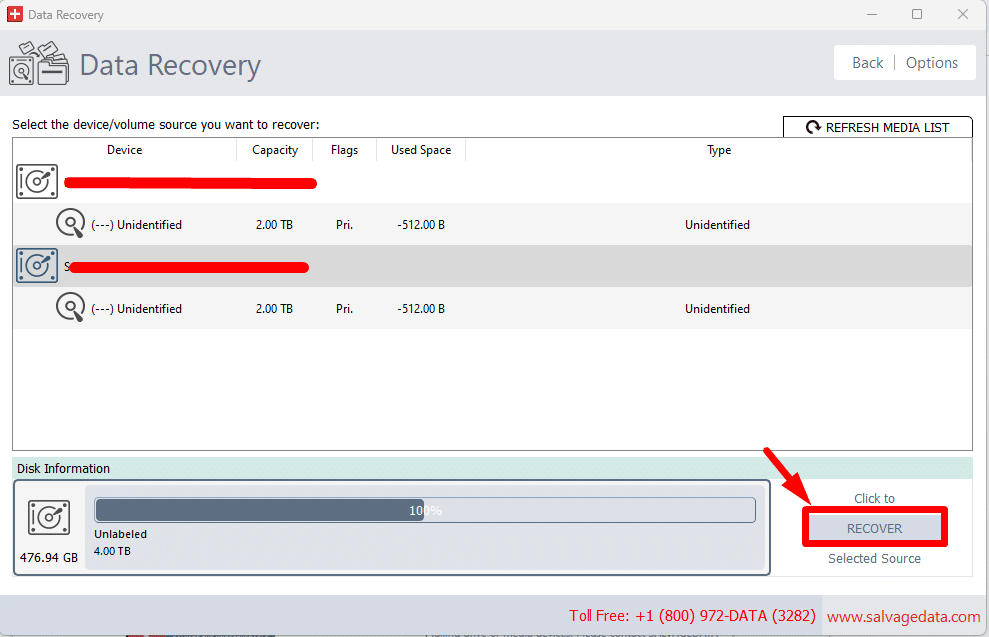
- Choose the file system and click on “SCAN”.
- Once the scanning process is complete, you can choose from the list which files you want to recover.
When to contact professional USB flash drive recovery services
Sometimes, data recovery experts are the only hope to salvage the lost data on your USB flash drive.
You must contact flash drive recovery experts when:
- Physical damage: If your USB drive has suffered physical damage. E.g., dropped, exposed to water, or bent. Professionals have the tools and expertise to handle such cases safely.
- Critically important files: If the lost data includes essential business documents, financial records, or irreplaceable personal files, the investment in professional recovery can safeguard against permanent loss.
- No success with software methods: If previous recovery software attempts have failed, consult experts who can employ advanced techniques to retrieve your data.
How to prevent USB flash drive data loss
Preventing data loss from USB flash drives is crucial for safeguarding important files. Implementing effective backup strategies and maintaining your USB drive can significantly reduce the risk of losing data.
Backup strategies
3-2-1 Backup Rule: This widely recommended strategy helps reduce the chances of permanent data loss, making it easier to recover files in case of accidental deletion or corruption.
- 3 Copies of Data: Keep three copies of your important files, including the original file and two backups.
- 2 Different Media Types: Store these copies on at least two different types of storage media (e.g., an external hard drive and cloud storage).
- 1 Offsite Backup: Keep one backup copy offsite to protect against local disasters like theft or fire.
USB Drive Maintenance
Proper maintenance of your USB flash drive can extend its lifespan and reliability:
- Avoid extreme temperatures: Keep your USB drive in a cool, dry place. Extreme heat or cold exposure can damage the drive and lead to data loss.
- Use quality, reputable brands: Invest in high-quality USB drives from well-known manufacturers. Cheaper, generic drives may be more prone to failure.
- Gentle physical handling: Handle your USB drive with care. Avoid dropping it or exposing it to moisture, as physical damage can lead to data loss.