
Summary:
- Check your "Recently Deleted" album first; photos stay there for 30 days for easy recovery.
- Your best chance for truly lost photos often lies in restoring from an iCloud, iTunes, or Finder backup.
- For severe cases or damaged devices, professional data recovery services offer a specialized last resort.
Have you ever felt that sinking feeling after accidentally deleting photos from your iPhone? Losing photos can be devastating, whether it's cherished family moments, vacation memories, or important documents. Fortunately, there are several methods you can employ to attempt to recover deleted photos from your iPhone or iPad.
When you delete a photo on your iPhone, it doesn’t vanish immediately. Instead, it moves to the "Recently Deleted" album, which remains for 30 days before being permanently erased. If you act quickly, you may be able to recover your photos with just a few taps. However, there’s a chance to retrieve the photo even if you can’t see it in the folder.
Important: It’s not possible to recover permanently deleted photos after the “Recently Deleted” folder was emptied or 30 days have passed from the deletion. Check our guide on how to recover deleted photos from your iCloud backup.
Methods to recover deleted photos from iPhone
Retrieving the deleted photos and images can be easy and fast, depending on where they are and how long they have been deleted. However, in some cases, you might also need professional help. Apply the solution that best addresses your case.
1. Recover iPhone deleted pictures using the Photos app
This should be your first step if you've just deleted your photos. This method works even if you've deleted photos from other albums or the main library. The photos will return to their original locations, maintaining your organizational system.
The process is simple and built right into your iPhone:
1. Open the Photos app.
2. Navigate to Albums and scroll down to find Recently Deleted.
3. Tap on Select in the top-right corner.
4. Choose the photos you want to recover and tap Recover.

2. Restore your deleted photos from backups
If your photos are no longer in the “Recently Deleted” folder, your next best option is to restore them from a backup. Always back up your iPhone to prevent losing photos, documents, or contacts.
Using Finder (macOS Catalina and later)
- Connect your iPhone to your Mac.
- Open Finder and select your device from the sidebar.
- Click on Restore Backup in the General tab.
- Choose the most recent backup and click Restore.
Using iTunes (macOS Mojave and earlier or Windows)
If you have a backup of your iPhone or iPad on iTunes, you can use this method to recover any lost photos.
- Connect your iPhone to your Mac or Windows computer using a USB cable.
- Open iTunes and select your device.
- Click on Restore Backup, select the appropriate backup, and confirm.

Using iCloud
If you have enabled iCloud on your device to upload your photos to your account automatically, then you should be able to recover deleted photos from iCloud using a previous backup.
- Go to iCloud.com and sign in.
- Click on Photos, then navigate to the Recently Deleted album.
- Select the photos you wish to recover and click Recover.
3. Third-party iPhone recovery software
If backups are not available or do not contain the deleted photos, consider using third-party recovery software. Programs like SalvageData’s free data recovery software can scan your device for recoverable files.
- Download and install the software.
- Agree with the terms and conditions.
- Click on the “DATA RECOVERY” option.
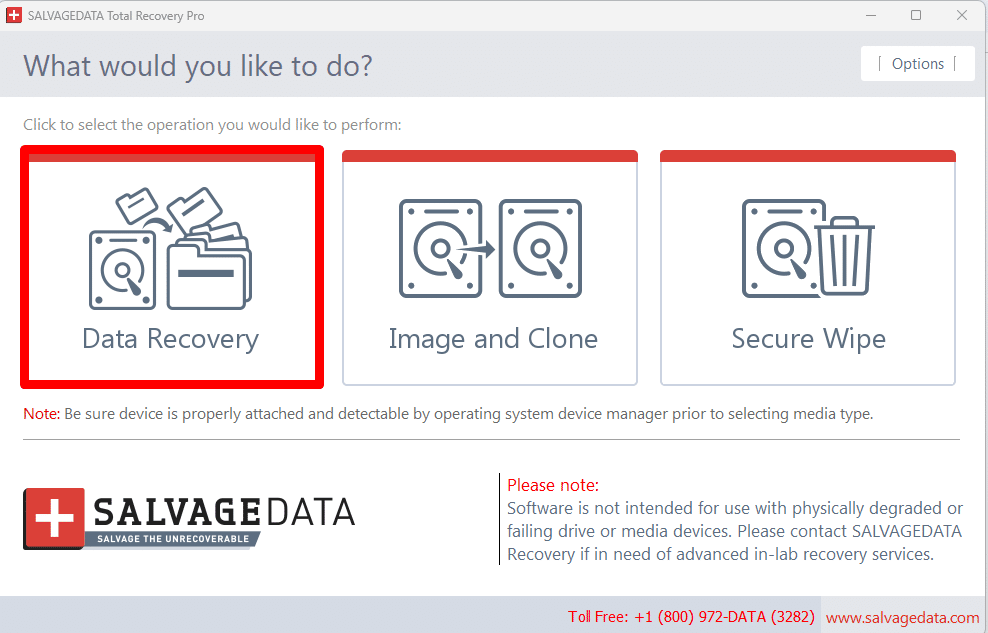
- Select the drive from which you wish to retrieve your files. Then, click on “RECOVER”.

- Choose the file system and click on “SCAN”.
- Once the scanning process is complete, you can choose from the list which files you want to recover.
Important: Stop using your device when you realize your data is missing. Data recovery software can’t retrieve overwritten files.
4. Recover from messaging apps
If you've shared photos via messaging apps like WhatsApp or Messenger, check them. Deleted images may still exist on their servers or in chat histories. You can also ask the person you shared the picture with to send you the photo.
5. Professional data recovery services
In cases of severe damage or if previous methods fail, professional iPhone data recovery services can help retrieve lost data from physically damaged devices. While this option may be costly, it is often worth it for irreplaceable memories.
When choosing the data recovery service provider, make sure to check the following:
- Certified security data recovery services
- Clean room facilities
- Request a detailed quote and recovery probability assessment
- Ensure they offer a "no data, no fee" guarantee
How to prevent iPhone photo loss
To avoid losing your photos in the future, consider implementing these strategies:
Make regular backups
You can schedule regular backups of your photos on iCloud or another cloud service and keep a backup copy on an external storage device to increase your photos’ security. If you ever need to recover deleted photos from an iOS device, you’ll have them backed up already.
Be careful when deleting photos on your iPhone
Pay close attention when deleting items on your device. Ensure you only delete the items you intend to delete instead of accidentally hitting the wrong option and erasing something important.
Do not format or perform a factory restore unless you have no intention to keep your data or already have a backup of it.
Keep your phone’s operating system and all apps up to date
To prevent software glitches or bugs that could lead to accidental photo deletion, it is essential to always keep your phone’s operating system and any other apps up to date with the latest available version.
Use folders and albums to organize your photos
Keep your photos organized so they are easier to find when needed. Grouping similar images makes it much easier to delete unnecessary ones and retain the important ones.
Avoid jailbreaking your device
Jailbreaking refers to removing software restrictions imposed by Apple on iOS devices. This allows users to gain root access to the operating system, enabling them to install unauthorized applications, tweaks, and customizations unavailable through the official App Store. While jailbreaking can enhance an iPhone's functionality, it comes with significant risks, including potential data loss.
Summing up
Recovering deleted photos from an iPhone or iPad is not impossible. To recover lost data, you can use iCloud to restore a previous backup, a third-party data recovery app, or iTunes if you have a backup version stored. Additionally, to prevent accidental photo deletion in the future, make sure to take regular backups of your photos and keep them organized in folders/albums. Also, be careful when deleting items on your device, and always keep all apps updated.
Contact SalvageData 24/7 for a personalized and secure data recovery service. We guarantee to do our best to recover your data, even if you believe your case is impossible.